Showing posts with label window. Show all posts
Showing posts with label window. Show all posts
Saturday, 3 February 2018

Monday, 22 January 2018
Beware! These “Forced” Chrome And Firefox Extensions Are Almost Impossible To Remove

Google Chrome is often labeled as one of the best web browsers around for all the right reasons. Players like Firefox are competing by adding innovative features, but Chrome continues to enjoy an unparalleled popularity. However, this doesn’t mean that Chrome is 100% secure. A security researcher has spotted malicious add-ons that’s almost impossible to delete.
These extensions have been spotted in both Mozilla Firefox and Google Chrome. They use techniques to redirect users away from pages where they can remove the extensions and try to hijack traffic for driving clicks on other web pages.
Chrome and Firefox both are affected
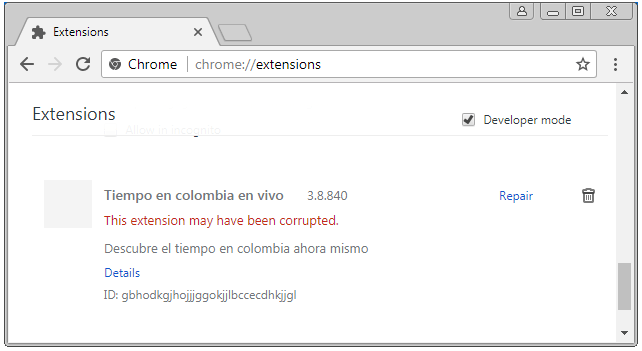
For Chrome, the researcher found an extension named Tiempo en colombia en vivo. It gets pushed via a method called “Forced Chrome Extension.”To drive away users from the extensions page, it redirects the uses from chrome://extensions/ to chrome://apps/?r=extensions. On this page, only installed apps are listed. Blocking JS in Chrome or starting Chrome with disabled extensions doesn’t help as well.
A method to stop the extensions from operating is by renaming the 1499654451774.js file in the extensions folder. It shows up in the extensions list as corrupted.
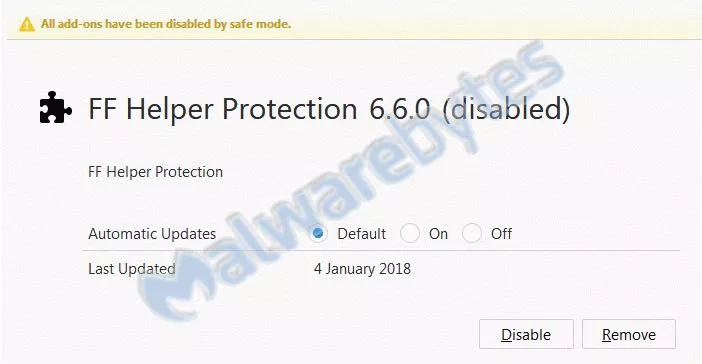
Malwarebytes also found a similar extension in Firefox with name PUP.Optional.FFHelperProtection. It blocks about:addons in background.js and prohibits the user from removing it.
Removal in Firefox is comparatively easier as one can see all the installed extensions by running the browser in safe mode.
While the exact extensions might not exist on the online stores at the moment, their modified versions continue to prevail. As they arrive on the machines of users via forced installs, it’s difficult to avoid them every single time. So, the users are advised to surf the web with caution and use recommended security methods. Before downloading extensions, users should also read their descriptions and reviews carefully.
It’s also worth noting that these extensions highlight a picture that involves Google’s failure to ensure proper scrutiny when it comes to Play Store or Chrome Store. So, unless Google makes its review process for third-party extensions and apps more stringent, such problems aren’t going to go away.
Monday, 15 January 2018
Microsoft’s OneDrive Files Restore Feature Will Make Ransomware Recovery Easier
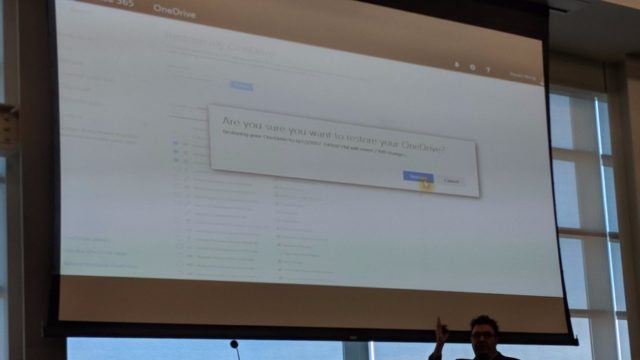
Microsoft is soon about to add a new feature to their cloud storage service called OneDrive. Known as Files Restore, the said feature would allow users to rollback their OneDrive storage to any point back in time and recover files they might have accidentally deleted or encrypt by some ransomware.
The details about the upcoming OneDrive files restore feature were dropped during a SharePoint Saturday San Diego presentation by Stephen L Rose, OneDrive for Business Senior Product Manager.
Files Restore could arrive in the next couple of weeks, but it’s not known whether it would be available for the users of OneDrive for Business only or all OneDrive users.
It appears very similar to how System Restore in Windows can be used to rollback a PC to an earlier system state to recover system settings and installed applications. The difference is that Microsoft is doing it for the files stored on OneDrive.
Certainly, users having the facility to recover files easily will motivate them to increase their use of cloud-based storage options. Although it might not be specifically intended, Files Restore could lessen the effects of ransomware attacks which prevent users from accessing their files until they agree to pay the ransom amount. However, users will have to enable cloud sync every time so that new files are regularly added to their cloud storage.
Friday, 12 January 2018
Microsoft: Be Ready For Significant Slowdown Of Your Old PC After Spectre Security Patches
When The Register broke the massive side-channel attack flaws pertaining to Intel and other CPUs, it was reported that the users should expect a significant slowdown after installing the patches. Now, Microsoft has performed some benchmarking tests and offered a concrete idea of what you should expect.
In a post on Microsoft’s Secure blog, Terry Myerson has shared some useful insights that all Windows users should read. You might be already knowing that hardware manufacturers and kernel developers had making combined efforts after being informed of the flaws under a non-disclosure agreement.

When it comes to patching the affected systems, Meltdown and one version of Spectre will have a minimal performance impact. However, fix for the second variant of Spectre will bring more significant slowdowns and the users would notice a performance decrease in their systems.
This slowdown becomes even more worrisome for users running Windows OS on older Intel CPUs–2015-era PCs with Haswell or older CPU, to be precise.
That’s not all. If you’re running older versions of Windows like Windows 7 and Windows 8, an even greater impact should be expected due to legacy user-kernel transitions.
In another related development, Microsoft has pulled Meltdown and Spectre Windows patches that bricked machines running AMD-powered computers. This is reportedly affecting the older AMD processors like Athlon X2 6000+.
As per Microsoft’s statements, they are working with AMD to resolve the issue and push the updates again as soon as possible.
Subscribe to:
Posts (Atom)
-
ER Model, when conceptualized into diagrams, gives a good overview of entity-relationship, which is easier to understand. ER diagrams can ...
-
For a huge database structure, it can be almost next to impossible to search all the index values through all its level and then reach the...
-
gfx multimedia making it work 8 th edition by tay vaughan download
-
DBMS stands for D ata b ase M anagement S ystem. We can break it like this DBMS = Database + Management System. Database is a collection ...

